Project 2: Path Following
This project will cover how to write a stanley controller on your car to follow a path through a set of gps points. A brief powerpoint presentation on this can be found here . All the poses and the other info have been given to your in the eml4930_gps_nav repo.
Due Date: TBD
Pseudo Code Due Date: TBD
Points: 100
ROS 2 Topics:
vehicle_pose(sub),current_goal_pose(sub) andvehicle_command_ackermann(pub)ROS 2 Messages :
PoseStamped(ingeometry_msgs) andAckermannDriveStamped(inackermann_msgs)
Deliverables
ROS 2 node that runs a Stanley controller as discussed in class in place of the vehicle_controller node.
* Pseudo Code for your Node. More information can be found here
* setup.py file filled out
* package.xml file filled out properly
* This is a qualitative assessment so no submissions are needed. You will need to run the node at Flavet Field by the due date. Grading will be based on the closeness to the path given.
Warning
The names of topics are important. Writing the topic names incorrectly will break the node.
Loading a Path from a YAML
The points that you will be visiting are available here. You will then need to create a path in google earth that follows these points and output a path .kml file.
To convert the .kml file, navigate to the scripts directory inside the eml4930_gps_nav repo. There is a .kml file converter to .txt of poses. You can do this by running the following command inside the scripts folder.
python3 kml_to_route.py example_file.kml output_file.txt
Calculating the Cross Track Error
Controllers
The Pure Pursuit controller [1] was developed in the early 1990s at Carnegie Mellon University as far as I can tell. It is a simple steering controller whose performance depends heavly on the choise of the look ahead distance.
- Inputs:
Vehicle Position: \(x_{veh}\). \(y_{veh}\)
Closest Position on Path: \(x_{c}\), \(y_{c}\)
- Outputs:
Steering Angle: \(\phi\)
The objective is to determine the steering angle to drive the vehicle to the path based on the current vehicle position. It will be minimizing the difference in heading and the the cross track error \(e_{cte}\).
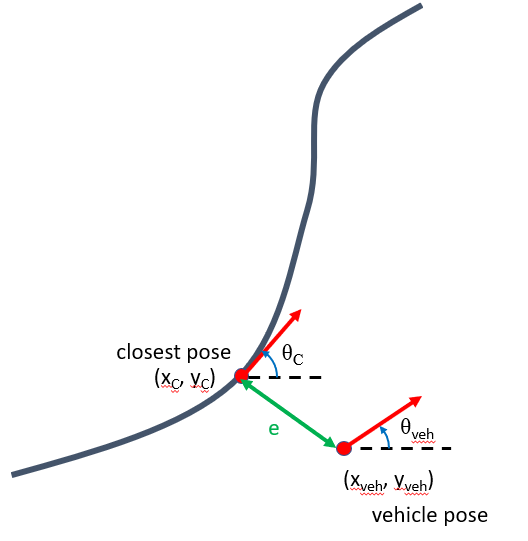
Figure 1: Definition of Stanley Controller Problem
The governing equation of this controller is as follows,
where \(e_{cte}\) is the distance between the closest and the vehicle projected along the closest pose’s y coordinates and \(v\) is the speed.
Note
\(e_{cte}\) will be negative if the closest point on the path is to the right of the vehicle pose.
The stanley controller [2] is controller developed by the Stanford Racing Team during the 2005 DARPA Grand Challenge. Stanley, the teams vehicle, went on to win the competition.
- Inputs:
Vehicle Pose: \(x_{veh}\). \(y_{veh}\), \(\theta_{veh}\)
Closest Pose on Path: \(x_{c}\), \(y_{c}\), \(\theta_{c}\)
- Outputs:
Steering Angle: \(\phi\)
The objective is to determine the steering angle to drive the vehicle to the path based on the current vehicle position and orientation. It will be minimizing the difference in heading and the the cross track error \(e_{cte}\).
Figure 1: Definition of Stanley Controller Problem
The governing equation of this controller is as follows,
where \(e_{cte}\) is the distance between the closest and the vehicle projected along the closest pose’s y coordinates and \(v\) is the speed.
Note
\(e_{cte}\) will be negative if the closest point on the path is to the right of the vehicle pose.
The PID controller is the industry standard for model less controllers due to its simple formulation. It is an error based controller where for steering control we will use the cross track error as the input.
- Inputs:
Vehicle Position: \(x_{veh}\). \(y_{veh}\)
Closest Position on Path: \(x_{c}\), \(y_{c}\)
- Outputs:
Steering Angle: \(\phi\)
Figure 1: Definition of Stanley Controller Problem
The governing equation of this controller is as follows,
where \(e_{k}\) is the cross track error calculated previosuly.
Note
\(e_{cte}\) will be negative if the closest point on the path is to the right of the vehicle pose.
Controller File Template
To calculate the crosstrack error call the function
crosstrack_error,error_heading_rad, _ = get_cross_track_and_heading_error(closest_pt,heading_closest_rad,vehicle_pt, heading_vehicle_rad)
This should return a tuple with the two errors you need for the stanley.
The template file can be downloaded below,
Put your controller in the main_timer_callback onwards.
Simulate your project by using a launch file similar to this,
Launch File for Point at Carrot
Note
Your launch file should be in a launch folder inside your package, something like package_name/launch/example_launch.py . Otherwise when you build the package it will fail.
Use the setup.py file given below to allow for launch files to work.
Running of Flavet Field
To run the car outside, you will need to run the vehicle launch file that we’ve talked about for months now. Then you can point your car East. When the car is east the heading value should be 0.
Then go ahead and launch your launch file with your controller. Your controller should be in place of the vehicle_controller in the launch file given.
You will also need to put your pose list in your package inside a folder called data, then update the launch file with the necessary names where it asks for the pose list. Then launch the vehicle launch file on your car.
ros2 launch vehicle_launch vehicle.launch.py
Then to launch visualizer run the launch file on your computer:
ros2 launch gps_nav visualization.launch.py
Then to have the car move, you need to set a speed parameter on the motion_spec_provider, to do this run the following command.
ros2 param set motion_spec_provider speed 2.0
Your car should start following the path, the person running the car should follow it with their laptop, so that your don’t lose connection.